Coming soon to the App Store

Pay for what
you ordered.Nothing else.

Scan the check, show a QR code, and everyone claims their own items in a browser. Tax and tip land where they belong.

iPhone app · guests need nothing

9:41▪▪▪ ▮
Split closed

Mama's Trattoria

September 12 · Party of 4

TOTAL$192.40

Claimed $192.40 of $192.40

  • A Alex (you) $42.90
  • B Ben $48.10
  • C Cleo $63.70
  • R Ravi $37.70

Closed

Items

  • Margherita Pizza$18.00
    Claimed by Alex
  • Cacio e Pepe$22.00
    Claimed by Ben
  • Branzino$34.00
    Claimed by Cleo
  • Caesar Salad$14.00
    Claimed by Ravi
  • Nero d'Avola$60.00
    Split evenly

You close the split. Every share is final.

A worked example on a $192.40 dinner for four at Mama's Trattoria. Each person claims what they ordered, and the $14.80 tax and $29.60 tip are divided in the same proportion. Your own items come to $33.00, so you carry $3.30 of the tax and $6.60 of the tip, for $42.90. Ben's share is $48.10, Cleo's $63.70 and Ravi's $37.70. Then you close the split.

What you do

Install Halver. Scan the check.

You are the one holding the receipt, so you are the one with the app.

and everyone else

What they do

Point a camera at a QR code.

The check opens in their own browser. Nothing to install, no account to make, no password to invent. That is the entire ask.

The night, in order

One dinner, start to finish

Each thing Halver does, at the moment in the evening it earns its keep. You are the one with the app. Nobody else at the table needs it.

  • Anyone at the table — works in a browser, nothing installed
  • You, in the app — the iPhone app only
STEP 1

The check lands on the table

Getting it into the app, in whatever form it arrived.

You, in the app

  • Point the camera at it Halver finds the edges, straightens the receipt, and reads the items and prices.
  • The reading happens on your iPhone Your phone does it itself. There is no cloud receipt recognizer, and there will not be one.
  • It tells you when the scan is off The review screen says in plain words whether the items add up to the printed total, and stops you on a bad scan.
  • Already have it as a photo, a screenshot or a PDF Pick it from your camera roll, or send it in with the normal Share button. Forwarded email receipts land in the app's Inbox.
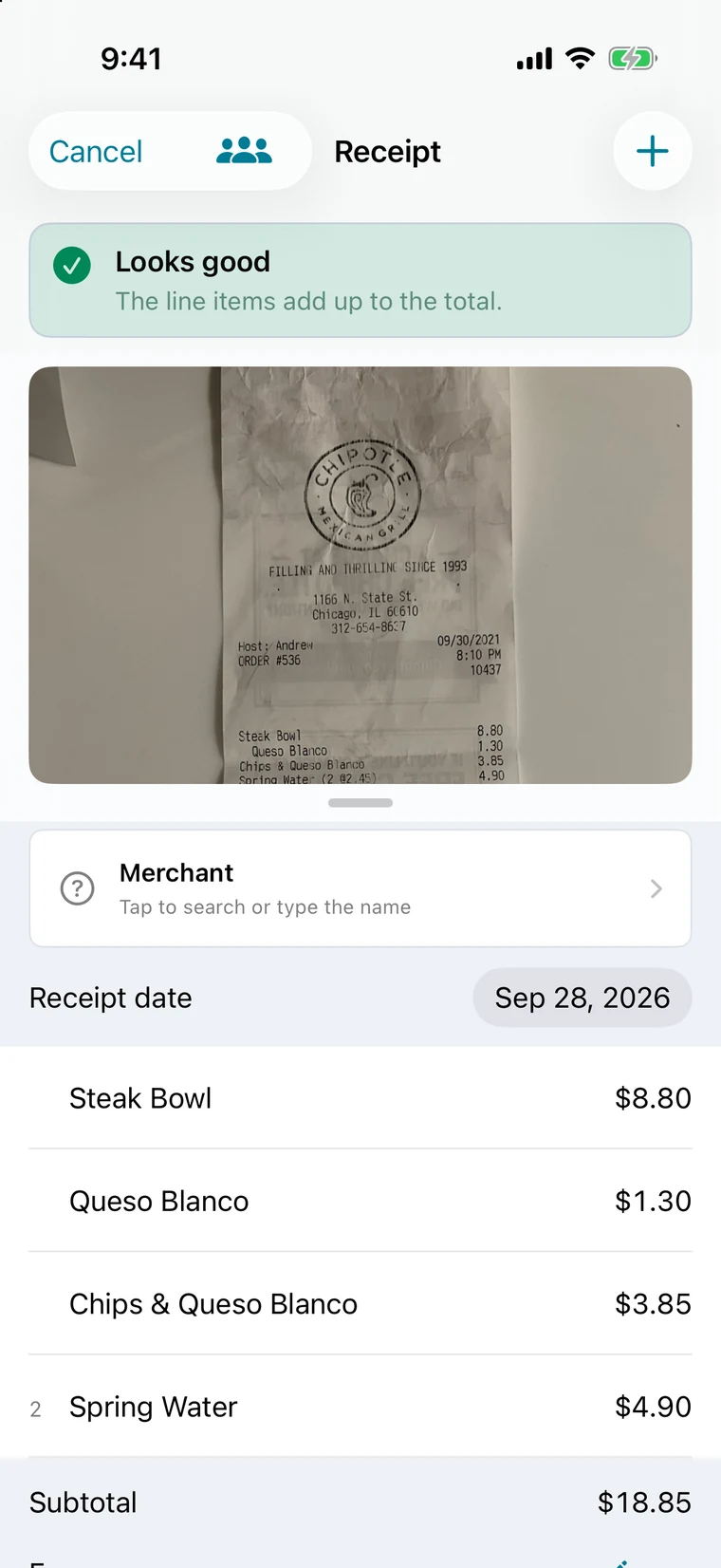
The review screen after a scan, reading “Looks good — the line items add up to the total,” above the receipt photo and the itemised list.

Review, before anyone claims anything
STEP 2

You show a QR code

The only thing you ask anyone to do all night.

Anyone at the table

  • They point a camera and they are in The check opens in their phone's browser — no install, no account.
  • Nobody has to ask whether you got the wings Other people's claims land on your screen a second or two after they tap.

You, in the app

  • The friend who will not get their phone out Add them by name and claim their items for them. They are still in the split, and they never touched anything.
The host's split screen showing a QR code for guests to scan, above the line “Guests scan this to claim their items.”

The host's screen · this code opens gethalver.com

STEP 3

Everyone taps what they ordered

Claiming, on whichever screen each person happens to be holding.

Anyone at the table

  • Everyone taps their own stuff The check comes up as a list of items and prices. Each person taps theirs and watches their own total add up.
  • Split the nachos Claim a whole item, or a share of it — a half, a third, a quarter. On a line like “3 Beers,” say how many were yours.

You, in the app

  • Mark the appetizers as everybody's Tap the calamari and the bottle of wine as shared, and they are divided across the table.
  • Two people claimed the same steak You see every claim on that line and can trim one or clear it.
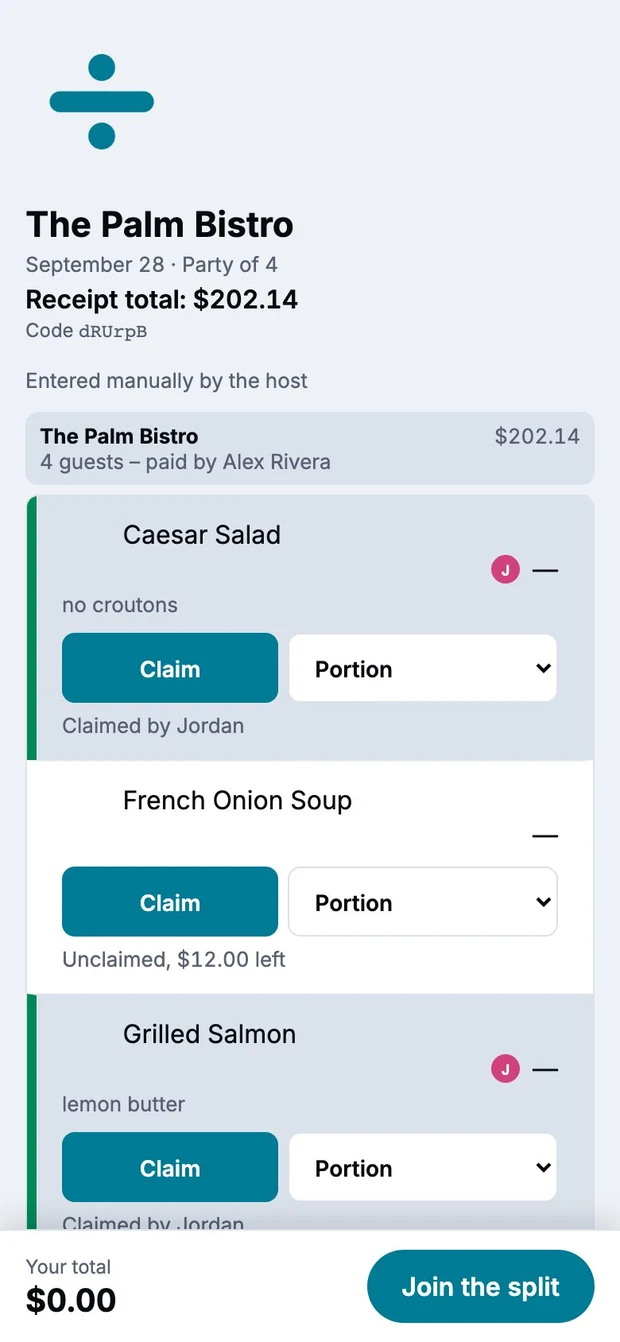
A guest's browser view of the check: each item with Claim and Portion buttons and who has claimed it, above their running total and a Join the split button.

A guest's browser — no app installed

STEP 4

The math sorts itself out

No arithmetic at the table, and no round number that quietly costs someone.

Anyone at the table

  • The salad-and-water person does not subsidize the steak Tax, tip and any service fee land in proportion to what each person actually ordered — never a flat split down the middle.
  • When three different cards went in Halver keeps the receipts straight and gives each guest one number per person they owe — one “Pay Andy,” one “Pay Priya” — not a stack of charges.
  • What nobody claims does not get dumped on the group An item nobody tapped, or a share left behind by someone who went home early, goes on the tab of whoever paid that receipt.

You, in the app

  • You owe them, they owe you: one payment If two people each covered part of the other's check, Halver cancels the smaller against the larger so money moves once, in one direction.
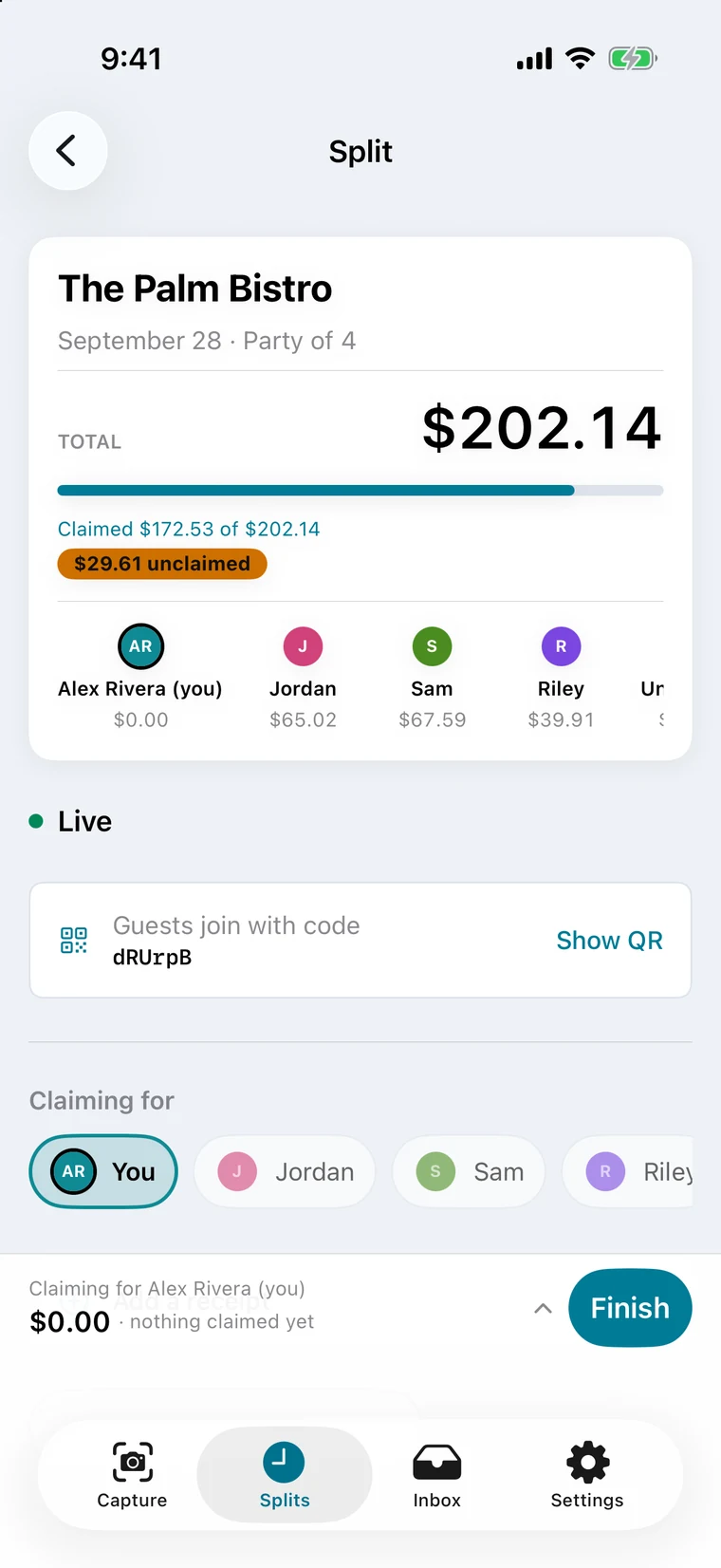
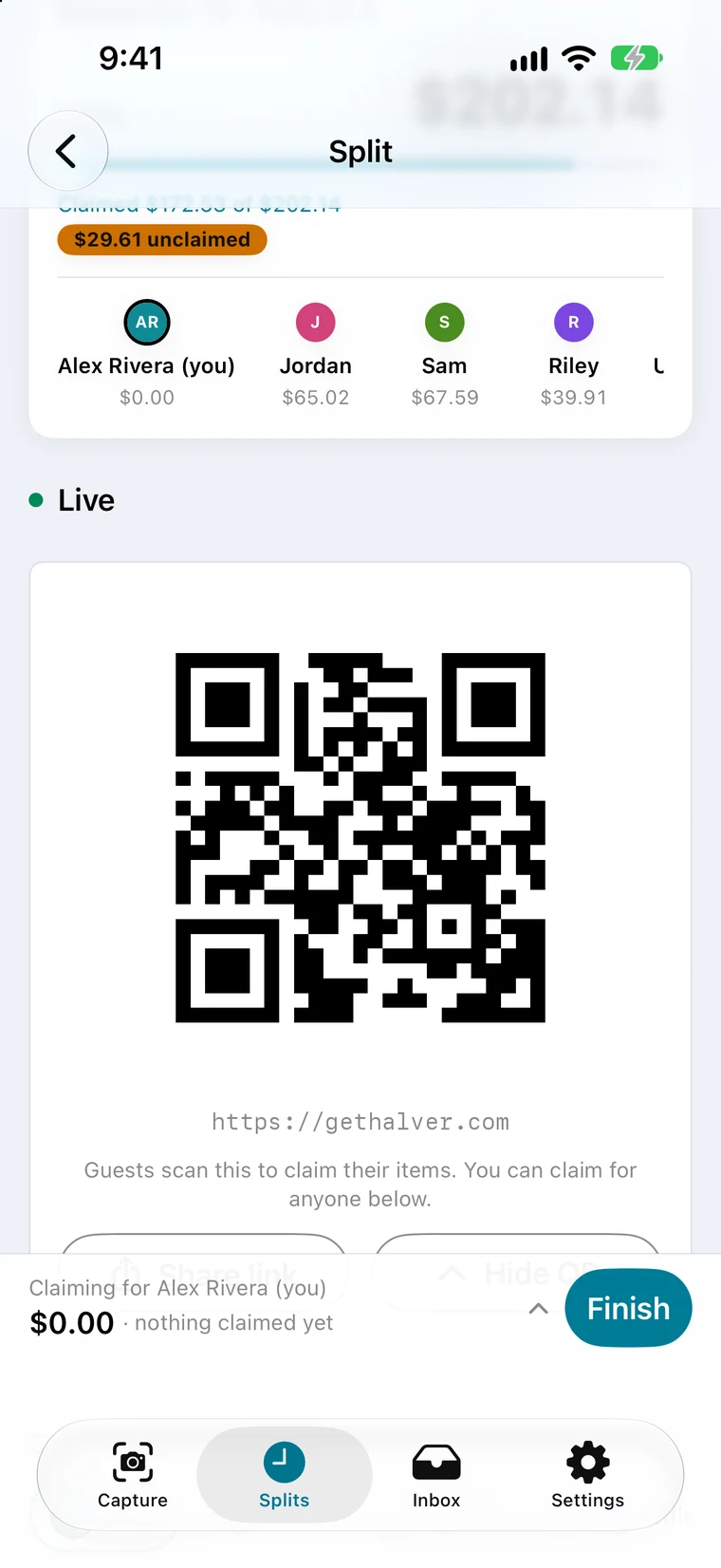
The host's split screen: the $202.14 total, how much has been claimed, $29.61 still unclaimed, and each person's share under their name.

The host's screen · each share, and what is still unclaimed

STEP 5

Everybody pays you back

Handoff, confirmation, and the paper trail.

Anyone at the table

  • Pay with whatever you already use Tap Pay and hand off to Venmo, Cash App or PayPal with the amount already filled in. For Zelle® payments, Halver copies the host's handle for you to paste into your bank's own app. Halver never touches the money.
  • No card numbers, no bank logins All Halver keeps is a Venmo username, a Cash App tag, a PayPal link or a phone number — the things you would text a friend.
  • “Paid” means the money actually showed up They mark that they sent it; you confirm when it lands in your own payment app. Your confirmation is the one that counts, and you can check off whoever paid cash.

You, in the app

  • Bill the friend who never signed up Type in their email at close and send a one-off itemized bill with a link to pay you. Every one carries an opt-out link.
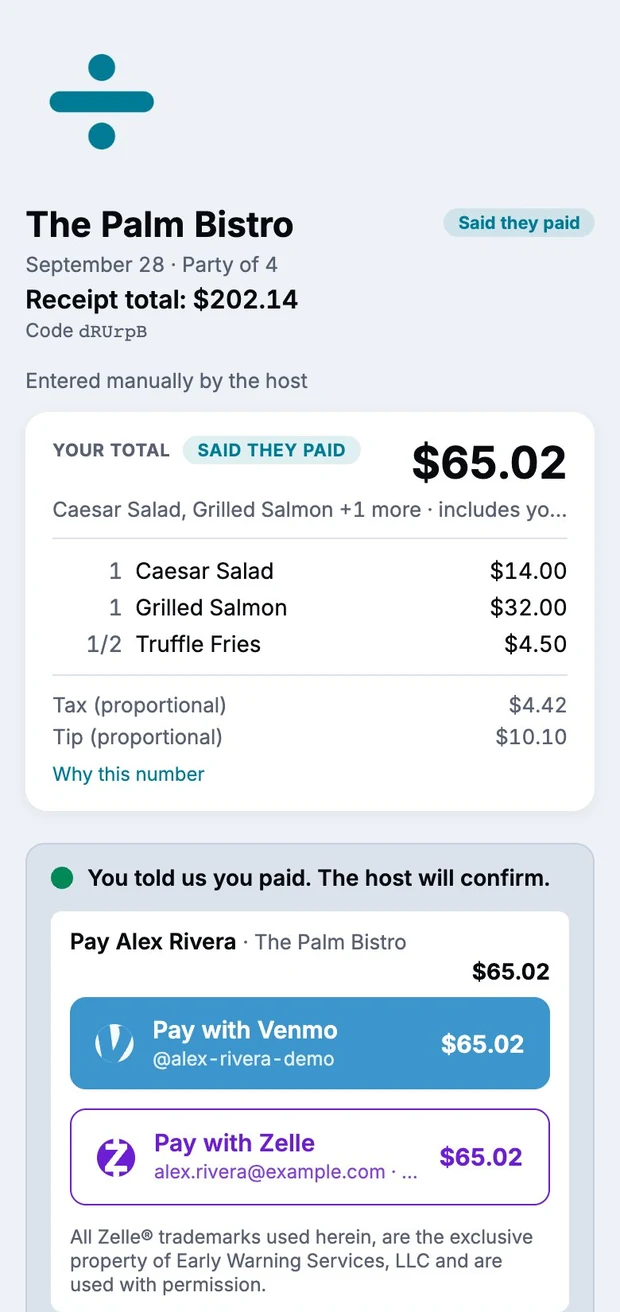
A guest's total with their items and a proportional share of tax and tip, above Pay with Venmo and Pay with Zelle buttons and the note “You told us you paid. The host will confirm.”

A guest's browser · paying the host

Everyone gets it in writing

Nobody relitigates it a week later

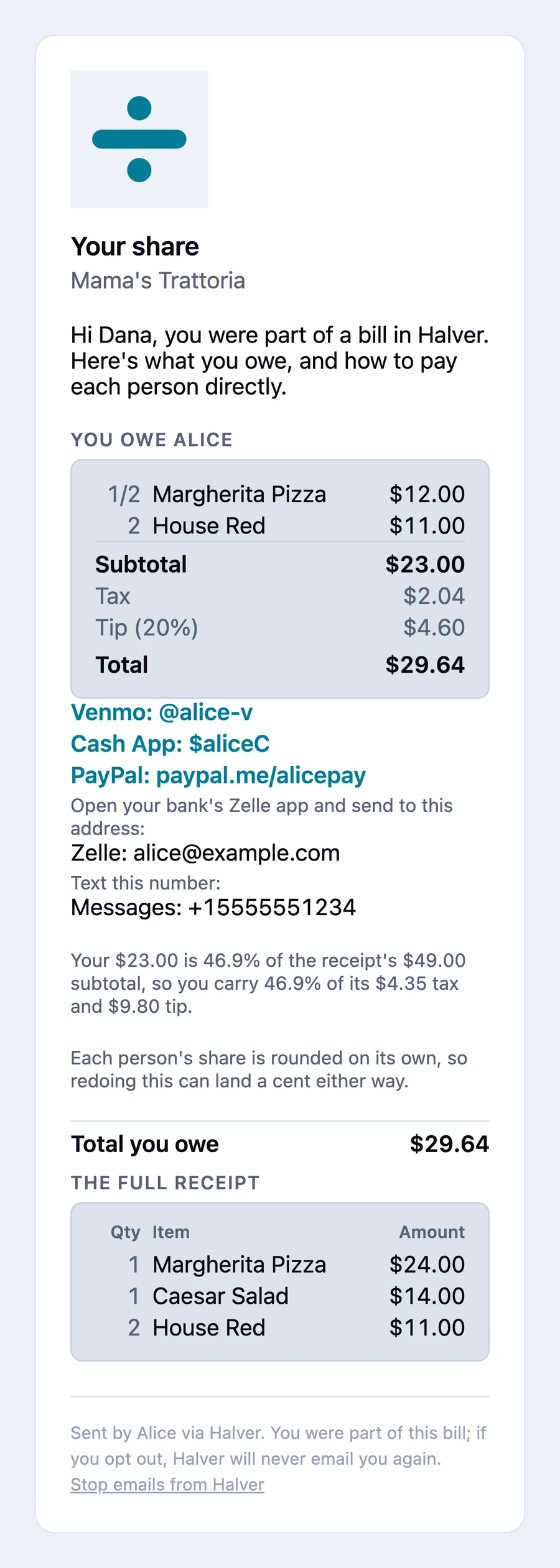
Close the table and you get a summary of who owes you and who has settled. Every signed-in guest who owes money gets their own itemized email: their items, their share of tax, tip and fees, and the whole receipt reprinted so they can check the arithmetic themselves.

“Your $23.00 is 46.9% of the receipt's $49.00 subtotal, so you carry 46.9% of its $4.35 tax and $9.80 tip.” From the settlement email

Guests who claimed from a browser have no address on file, so the host can add one at close to send them the same bill.

The settlement email, headed “Your share,” showing the guest's items, their subtotal, tax, tip and total, followed by direct payment links for Venmo, Cash App, PayPal, Zelle and text.

When you'd actually pull this out

The nights that need it

Dinner out with friends

Six of you, one check, and nobody wants a fourth money app on their phone.

→ Show a QR code. They claim in a browser. Tax and tip land by what each person ordered.

The big one you got stuck with

Twelve people for a birthday, your card on the table, and three of them left before the check came.

→ Claim for whoever is gone, fix it when two people grab the same entrée, and send an itemized email at close.

Group takeout, no paper at all

The order goes in from one phone, the receipt arrives as an email, and eight people owe you fourteen-something.

→ Forward it to your Halver inbox, or share it straight in from the delivery app. The rest is identical.

Two of you both put a card down

You covered the first round and the appetizers; they got the entrées. Now you each owe the other something.

→ Halver cancels the smaller against the larger, so one payment goes one direction.

The friend who is never going to install anything

They did not scan the code, they have already gone home, and you are still out thirty-eight dollars.

→ Type in their email at close and send a one-off itemized bill with a link to pay you.

Just you and a receipt

No group, no code, nobody to wait on — you only need to know what is yours, or to send one person their share.

→ A solo split runs entirely on the phone, with no signal.

Afterwards

In March you will want to know what that Tuesday actually was

Halver is not an expense tool. But everything it kept is still yours to use.

You, in the app

  • Every check you have split, still there Grouped by month, searchable by restaurant, filterable to still open, still owed, or settled.
  • Open a dinner from March and see all of it The full itemized receipt, each person's subtotal, tax, tip and fee, and who owed whom and whether they paid.
  • The photo of the check is kept too Reopen it full-screen from Splits any time, and share or save it.
  • A second stop ends up on one bill Dinner, then the bar. In Splits, tap Select, tick the receipts from that night, and tap Combine — they are split together as one bill instead of two.
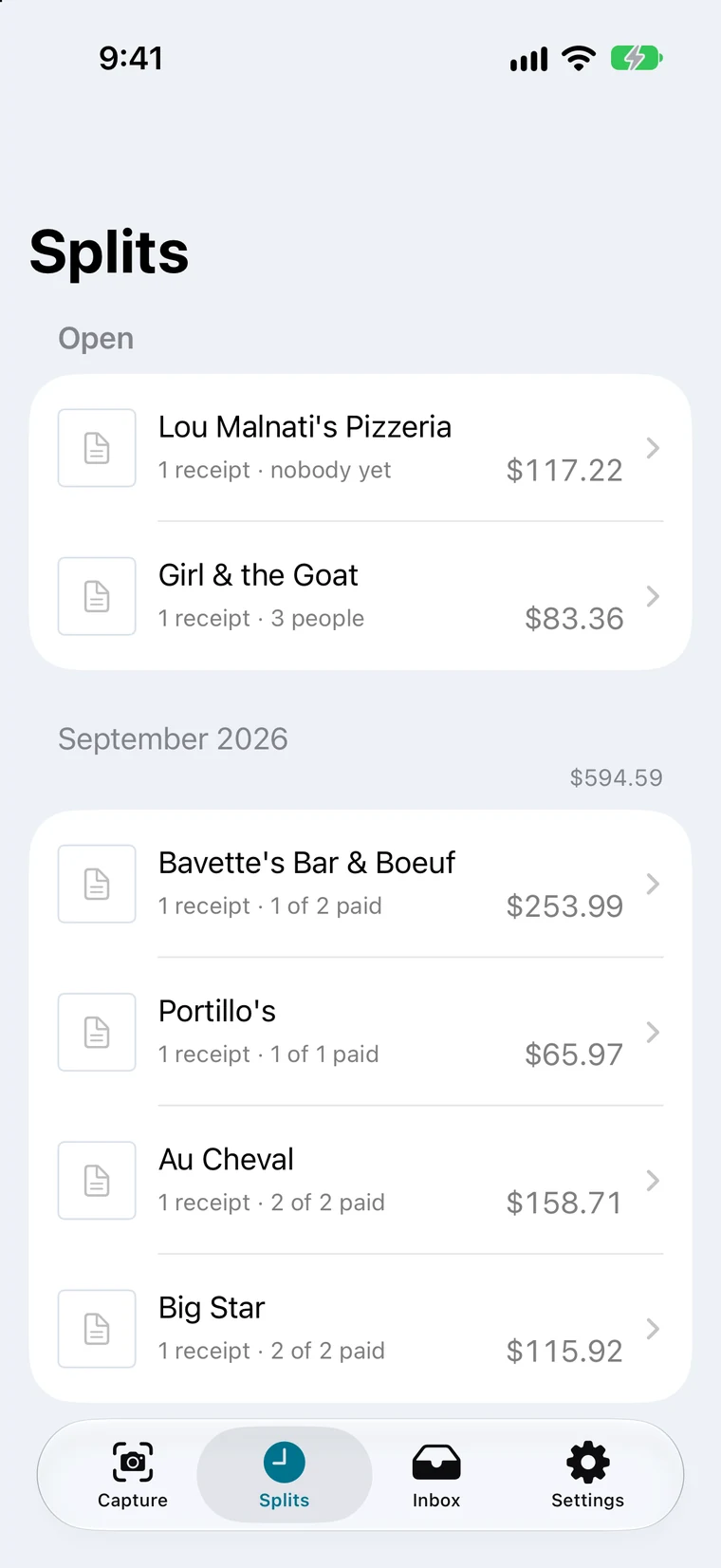
The Splits screen: two open splits at the top, then September's splits with the total for the month and how many people have paid on each row.

Splits · every check, grouped by month

What Halver does with your things

Stated plainly, including the limits

The photo never goes anywhere to be read

Your iPhone reads the receipt itself, using Apple's Vision framework. There is no cloud receipt recognizer and there never will be. During a session the photo is shown only to signed-in participants, and it is deleted from Halver's servers when the host closes the table.

Halver is not a payment processor

It stores no card numbers and no bank logins — only the handle you would text a friend. The money moves in Venmo, Cash App, PayPal or your own bank's app, never through Halver.

No tracking code, no ads

No Facebook Pixel, no Google Analytics, no ad attribution. One analytics tool counts app launches against a scrambled per-device identifier — not a cross-app advertising identifier, but an identifier all the same.

Your location is used in the moment, not kept

Halver uses where you are to suggest the restaurant, and does not save your coordinates. The restaurant's own name, address and coordinates are saved with the bill, the way they appear on a paper receipt.

Notifications never name a number

Your phone tells you when a receipt is added, when a payment to you is confirmed, and when the table closes. The text never carries an amount, a person or a restaurant name.

Delete your account from inside the app

One button in Settings, behind a confirmation. It takes your sessions, receipt photos, push registrations and forwarded-email records with it.

Coming soon to the App Store

Put the check down.

Everyone at the table pays for what they ordered, and you stop doing arithmetic over dessert.